Our TIMELI task goes beyond standard video-based summarization and indoor navigation benchmarks for MLLMs: we uniquely emphasize spatio-temporal coherence and planning in delivering continual language instructions under dynamic, end-user interactive settings.
On this website, we provide additional details on:
(1) benchmark construction and formulation, including data generation, annotation, and quality validation processes;
(2) full prompt structure and experimental details, including metric definitions;
(3) model ablations and additional results, including a preliminary validation in closed-loop real-world settings,
leveraging a smartphone-based app instantiation and generalization ablations on related real-world tasks to further study the benchmark's impact; and
(4) additional qualitative results, including both success and failure cases.
This video is divided into four key segments (please enable audio):
0:03 – 0:39TIMELI Benchmark: we show the collected simulation benchmark, which shows ground truth annotations paired with the front-view video.
0:40 – 1:12ChatGPT-4o Performance: ChatGPT-4o provides redundant instructions, and some new instructions are issued before the previous ones are completed, potentially overwhelming users.
1:13 – 2:05Finetuned Model Performance: our model learns not only what to say but also when to say it. As demonstrated, instructions are delivered at appropriate times without redundancy.
2:06 – 2:57Generalization to Real-World Videos: despite being trained only in simulation, our model demonstrates strong generalization to real-world scenarios on YouTube videos.
TIMELI includes both a rule-based synthetic simulation benchmark and a human-annotated real-world benchmark, each developed and validated through iterative design.
Iterative Design with Orientation and Mobility (O&M) Guides:
We conducted a two-hour focus group with three mobility guides ($50/hr) on real-world guidance strategies (e.g., clock orientation, affirmations at intersections, silence otherwise).
Guides later supported blind participants remotely, emphasizing salient objects within cane range. While our focus was on cane users, guides noted guide dog users may also benefit from off-ground contextual cues.
We find that effective guidance requires fine-grained 3D scene understanding beyond simple turn/object classification, and that user-specific preferences motivate future personalization.
Synthetic Scenarios:
Using preliminary data, we designed navigation scenarios in CARLA and iteratively refined them with mobility guides.
We find that off-the-shelf models often issue repetitive, mistimed, or contextually incorrect instructions (as demonstrated in the video).
To address this, we designed a rule-based instruction generator that emphasizes concise, timely feedback which is triggered by distance to landmarks, fixed intervals, or deviations >30° during crossings.
We sampled 1,000 clips using this procedure, validated and refined them with guides, and produced the final benchmark.
1.2 Adapting CARLA to Realistic Assistive Navigation Scenarios
We adapt CARLA to support rule-based instruction generation for assistive navigation, informed by real-world studies and feedback from O&M experts.
Pedestrians are equipped with egocentric sensors and randomized goals across varied towns and weather.
Sampling Realistic Paths:
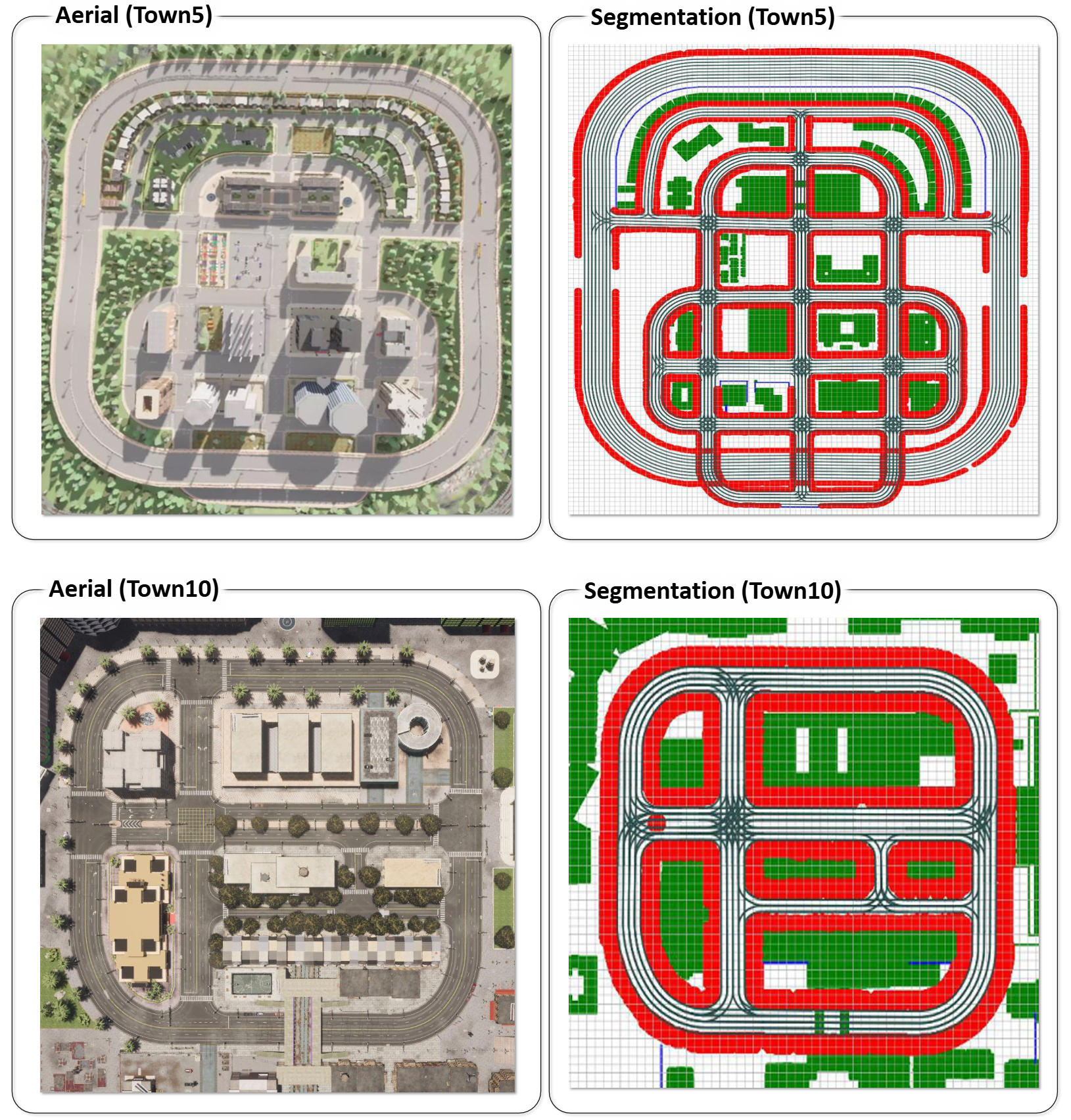
We increase path diversity by sampling waypoints near buildings and curbs and adding noise to simulate veering, as shown in Figure 1.
Walkable regions are extracted using semantic maps, and route planning is handled with A* search. These paths generate video data at one frame per second, along with metadata such as obstacle type, location, and weather.
Instruction Generation:
Instructions are generated using a Compound Action Specification (CAS) based on user orientation, route progress, and environment context. Each instruction includes: Action, Direction, and Angle.
We add context with nearby object or landmark descriptions (e.g., “building on the right”) using nine object types: building, fence, pedestrian, pole, vegetation, vehicle, wall, traffic sign. Relative directions are: in front, left, right, slightly left, slightly right, around.
Objects within 1.5m (cane range) trigger instructions like: ''Continue walking forward. Be careful, pole in front. Then turn slightly left. Vehicle on your right.''
A bird’s-eye view (from segmentation and depth maps) helps calculate distances.
Event-Driven Navigation Prompts:
While on sidewalks, instructions are triggered when a turn is required or an obstacle is detected within 1.5m.
At junctions, minimal instruction is used to avoid distraction. Example prompts include: ''You are approaching junction in five meters.'', ''You have exited the junction.''
We also log the reasoning behind issuing or withholding instructions, such as obstacle detection, path turning, or being inside a junction.
Figure 1: Extracting Layout Details for Modified Pedestrian Paths. We extract walkable and
sidewalk space in the map, and employ it to sample waypoints nearby buildings and curbs. In
the figure, red denotes sidewalk space and white and green denotes road or obstructed space. The
sampled waypoints are then provided as intermediate goals to guide path planning for spawned
pedestrians during data collection. This ensures a realistic and challenging benchmark.
1.3 Real-World Video Annotation Process
Our in-situ dataset is a small, scenario-driven collection manually annotated by mobility guides. To improve generalizability, we expand our analysis using a larger dataset curated from publicly available outdoor walking videos, primarily filmed in U.S. locations and sourced from YouTube.
All original video links will be listed in our GitHub repository. We are committed to ethical data use and will promptly honor any takedown requests from original content creators.
To validate our model’s real-world transferability, we curated an additional test set using publicly available YouTube videos, annotated by human annotators.
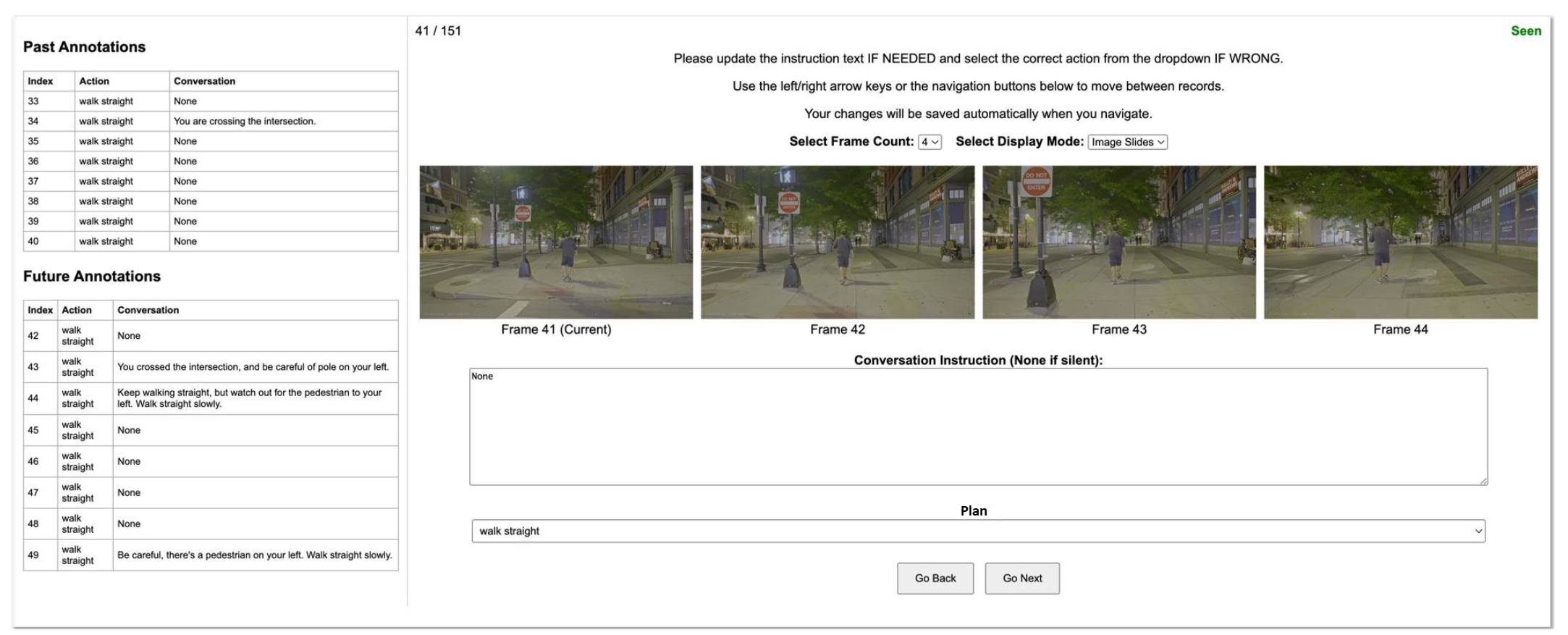
As shown in Figure 2, we developed a custom annotation interface where annotators review videos alongside suggested instructions generated by GPT-4o.
The interface displays four consecutive frames (1 FPS), with the current frame on the left and the next three seconds to the right.
A text box shows the suggested instruction from GPT-4o, which annotators can edit for accuracy. The interface includes frame navigation buttons, keyboard shortcuts, an option to display 4 or 8 frames, and a GIF mode for dynamic visualization.
In total, we collected 10,000 annotated video clips for evaluation.
Figure 2: Annotation Interface for YouTube Videos We collect a diverse set of U.S.-based YouTube
videos and manually annotate them through the interface in a multi-round validation process.
2 Experimental Settings
2.1 Prompt and Input Settings
In-Context Learning Prompt for Off-The-Shelf Models:
We find that prompt design plays a crucial role in enabling models to understand the information needs of blind end-users.
In our baseline prompt for off-the-shelf model analysis, we provide goal coordinates (a 2D vector representing a relative target, see Section 3.1 of the main paper), along with instruction prompts guiding the LLM to generate navigation directions, as illustrated below.
          You are guiding a blind person. The blind person needs to approach the goal
          [x,y]={goal coordinate} located in relative longitudinal and latitudinal offsets in meters.
          Generate an instruction for the current frame. You will need to provide step-by-step verbal
          navigation instructions to help them reach the destination safely and efficiently.
          Instruct the user to stay on the path to the goal, only notify what is
          needed, including immediate turns they need to make and obstacles to avoid
          within 1.5m (cane distance). Keep the instructions in junctions minimal for
          safety to avoid distraction as the user relies on hearing to navigate and listen
          to traffic. You should generally not instruct the user for consecutive frames
          unless absolutely needed, and avoid too frequent instructions. Only return the
          instruction to convey. Return “None” for remaining silent.

          Examples:
          Input: goal: [x,y]=[0,1], Output: Keep walking straight.
          Input: goal: [x,y]=[0,1], Output: None.
          Input: goal: [x,y]=[1,0], Output: Turn right and keep crossing.
          Input: goal: [x,y]=[0.5,0], Output: Turn slightly right and keep walking. There’s a pole on your left.
          Input: goal: [x,y]=[-1,0], Output: Turn to your nine and keep walking. There’s a pole on your right and vehicle on your left.
          Input: goal: [x,y]=[-0.5,0], Output: Turn slightly left and continue walking. There’s a vehicle on your left.
          Input: goal: [x,y]=[0,-1], Output: Turn around. There’s a fence on your left.
Basic Prompt for Fine-tuning:
To analyze the role of inputs to the model, we first fine-tune models with the basic prompt below, which contains the goal coordinate and instructions to guide users.
          You are guiding a blind person. The blind person needs to approach the goal
          [x,y]={goal coordinate} located in relative longitudinal and latitudinal offsets in
          meters. Generate an instruction for the current frame. You will need to provide
          step-by- step verbal navigation instructions to help them reach the destination
          safely and efficiently. Instruct instruct the user to stay on the path to the goal,
          only notify what is needed, including immediate turns they need to make and
          obstacles to avoid within 1.5m (cane distance). Keep the instructions in junctions
          minimal for safety to avoid distraction as the user relies on hearing to navigate
          and listen to traffic. You should generally not instruct the user for consecutive
          frames unless absolutely needed, and avoid too frequent instructions. Only
          return the instruction to convey. Return “None” for remaining silent.
Prompt with History, Plan, and Reason Prediction for Finetuning:
The models denoted by
‘+’ are trained with the below prompt, which contains history, plan, information and prompting
instruction to predict reasons for the navigation instruction:
          You are guiding a blind person. The blind person needs to approach the goal
          [x,y]={goal coordinate} located in relative longitudinal and latitudinal offsets
          in meters. The high-level plan: {plan}, needs to be followed safely. You have
          conveyed the following instructions in the past: {history information}. Generate
          an instruction for the current frame. You will need to provide step-by- step
          verbal navigation instructions to help them reach the destination safely and
          efficiently. Instruct instruct the user to stay on the path to the goal, only notify
          what is needed, including immediate turns they need to make and obstacles to
          avoid within 1.5m (cane distance). Keep the instructions in junctions minimal
          for safety to avoid distraction as the user relies on hearing to navigate and listen
          to traffic. You should generally not instruct the user for consecutive frames
          unless absolutely needed, and avoid too frequent instructions. Only return the
          instruction to convey. Return “None” for remaining silent.
          Answer in JSON format. There should be a key “reason” and a key “instruction”
          in the JSON.
          { “reason”: “One of the following: ‘remain_silent’, ‘remain_silent_in_junction’,
          ‘enter_junction’, ‘exit_junction’, ‘obstacle_in_front’, ‘constant_instruction’,
          ‘direction_change’, ’stop”’, “instruction”: “The spoken instruction provided to
          the blind navigator corresponding to the specified reason”}
2.2 Closed-Loop Evaluation with Noisy Conditions
We evaluate model performance in a closed-loop manner by conducting interactive experiments and evaluations in a blind simulation environment.
In this simulation, an ego-centered walker executes instructions predicted by the model and follows the goal. To simulate realistic sensor measurements and account for real-world uncertainty,
we further add Gaussian noise to both the goal coordinates (Gaussian noise with mean = 0°, SD = 2.0m) and the pedestrian’s orientation (Gaussian noise with mean = 0°, SD = 5°).
3 Additional Experimental Analysis
3.1 Results Summary
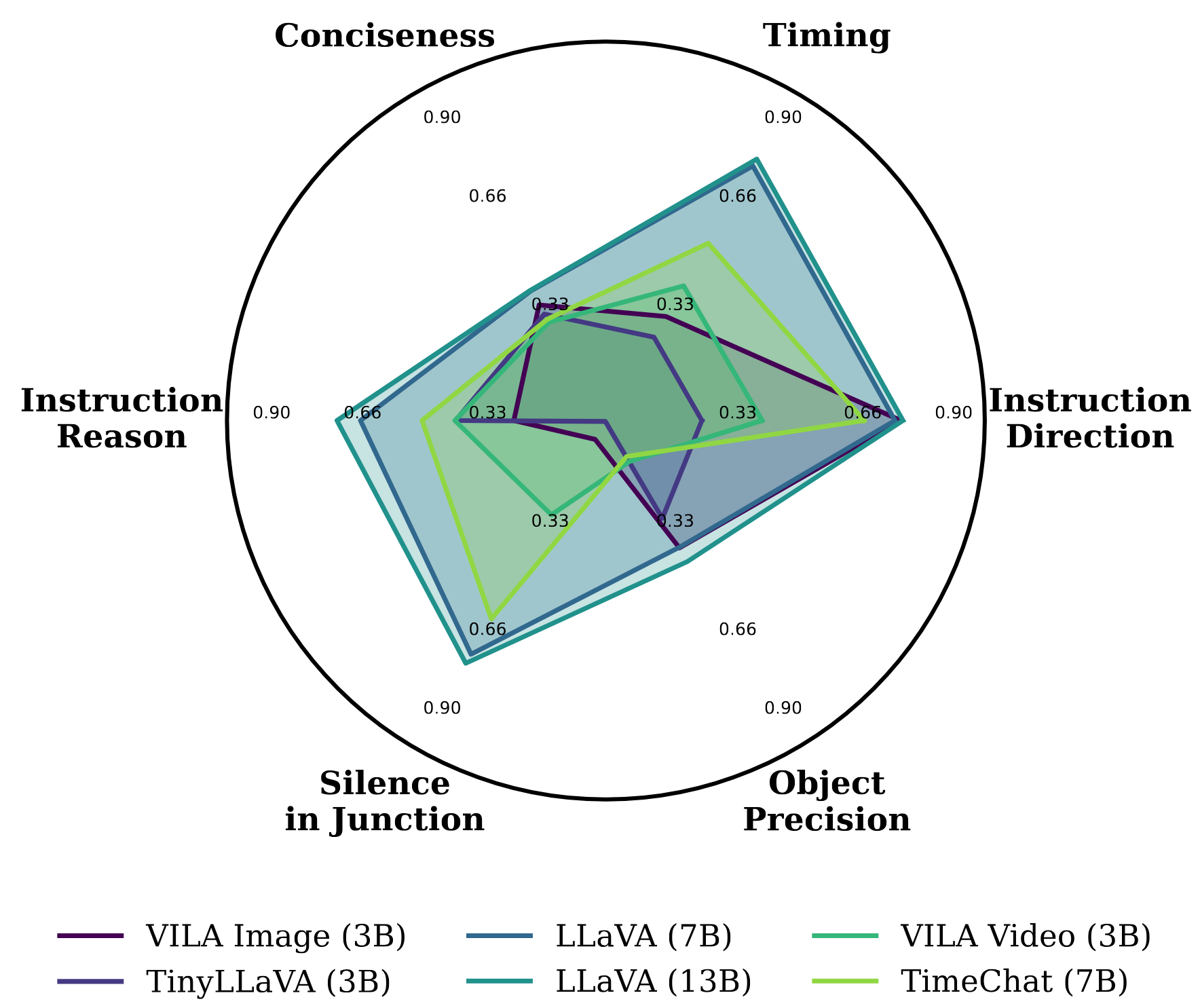
Open-Loop Evaluation Summary:Figure 3 summarizes the performance of fine-tuned models on TIMELI in an open-loop simulation setting.
The results highlight key challenges in interactive decision-making: models frequently exhibit poor timing, confuse directional instructions (e.g., "left" vs. "right"), and tend to generate overly verbose responses.
Figure 3: Radar Plot for Fine-tuned Models in Simulation. We leverage the proposed video-based
assistive navigation task to evaluate multiple dimensions of instruction generation models.
By finetuning models on our TIMELI benchmark, we observe that existing models frequently make errors in
our navigation task, including timing of instructions (Timing), clarity and brevity of communication
(Conciseness), identification of the reason (Instruction Reason), appropriate silence in intersections
(Silence in Junction), accuracy in detecting relevant obstacles (Object Precision), and correctness of
direction (Instruction Direction).
3.2 Model Components Ablation
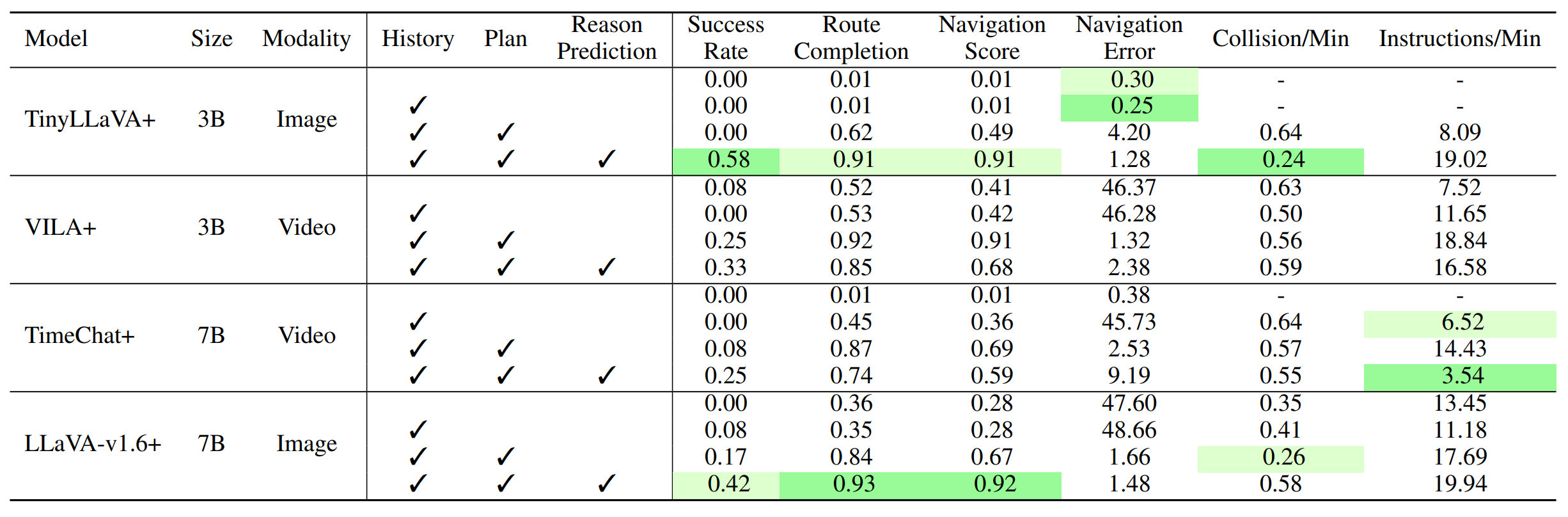
To evaluate the impact of different components in our model, including input instruction history, high-level navigation plans,
and reason prediction, we incrementally add each component into the model and evaluate its performance in both open-loop and closed-loop settings.
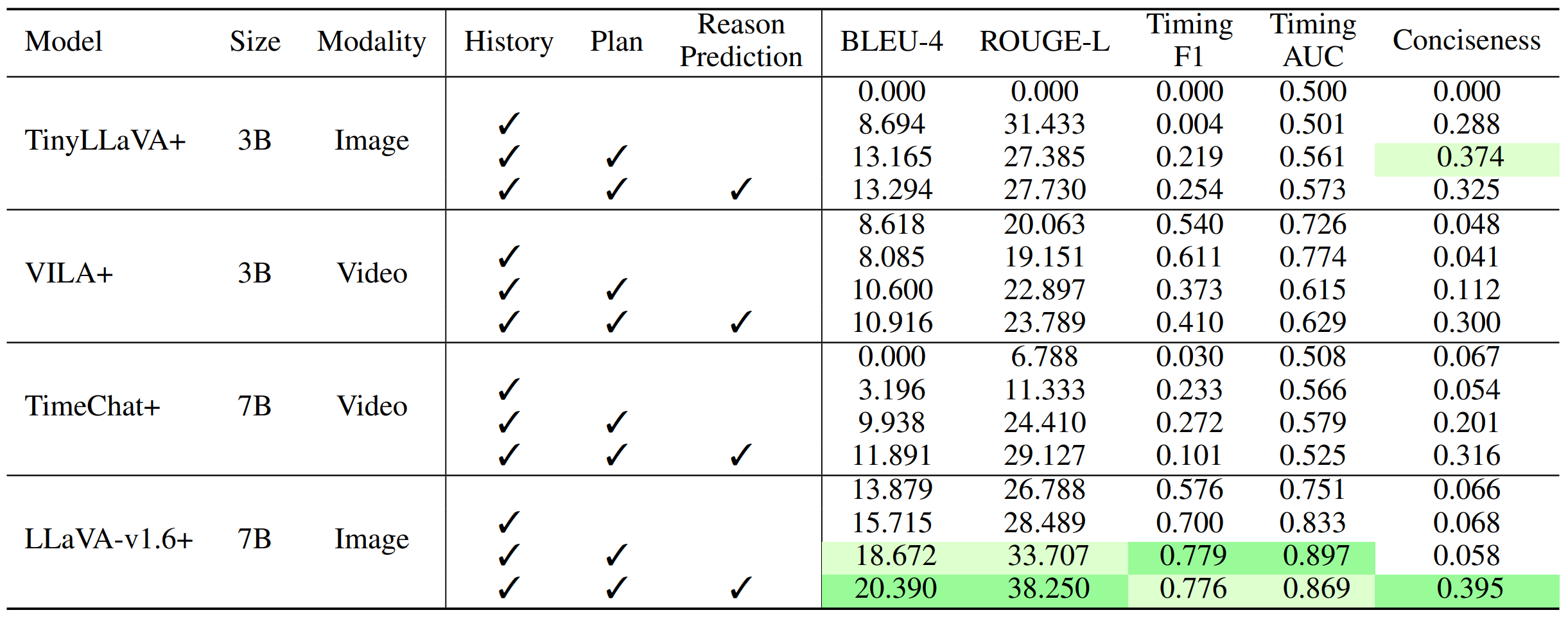
Table 1 and Table 2 indicate that the incremental addition of each component consistently enhances the model’s performance across both open-loop and closed-loop evaluations.
In particular, adding direct supervision for reason prediction shows a substantial improvement, which helps the model better understand and articulate the rationale behind navigation instructions.
Table 1: Impact of Model Components in Open-Loop Setting. To analyze the impact of different components added to TIMELI models,
we report the performance of each models by incrementally adding inputs (history and high-level plan) as well as output reason prediction.
Notably, the direct reason prediction supervision leads to consistent improvements across all metrics.
Table 2: Impact of Model Components in Closed-Loop Setting. To evaluate the impact of each component added to the TIMELI models,
we report performance in the closed-loop setting by incrementally incorporating inputs (history, plan) and output reason prediction.
Following the open-loop evaluation, the reason prediction module leads to consistent improvements across all metrics.
3.3 Inference Time
We evaluate the trade-off between inference time and model performance with and without the early exit mechanism.
The large LLaVA-v1.6 model has a runtime of 1.22 seconds per frame, while the tiny model runs at 0.77 seconds per frame.
With early exit enabled, we observe a significant reduction in inference time with minimal impact on performance, e.g.,
the large model’s runtime decreases to 0.99 seconds per frame, achieving an 18.85% speedup,
while key metrics such as route completion score in closed-loop evaluation remain unaffected.
3.4 Preliminary Smartphone-based Evaluation
Although the task remains challenging, we conducted a preliminary supervised user study with ten blind participants using a smartphone-based application to assess system performance and collect feedback.
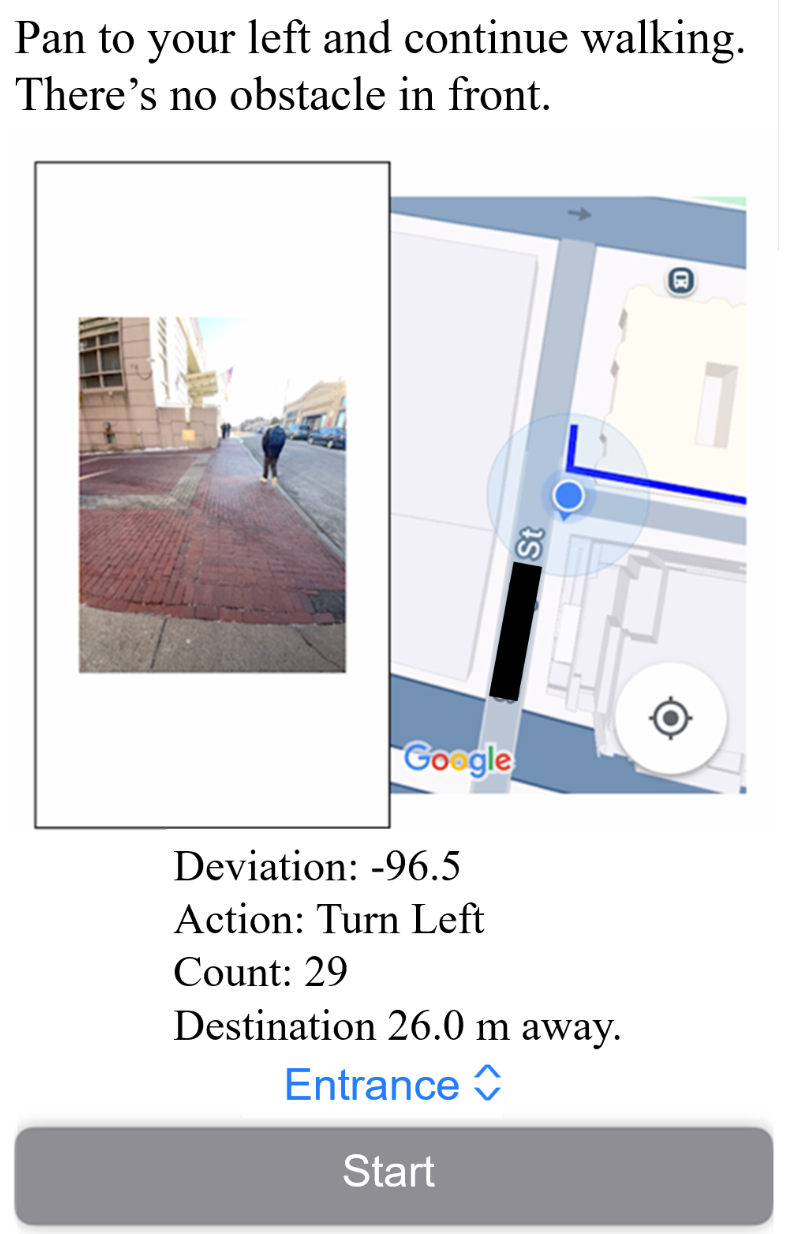
Figure 4 shows the interface used in real-world closed-loop experiments, developed on iOS and integrated with the Google Maps API for route planning. Based on GPS data,
the system computes local goal positions and issues corresponding commands. A front-facing camera captures 60 FPS video, which, combined with positional data, is processed by a lightweight MLLM to generate navigation instructions.
Non-silent outputs are delivered via a text-to-speech engine. We tested three real-world routes: two 50-meter paths with one turn, and a 100-meter route with two turns and an intersection.
As shown in Table 4, the overall success rate was 40%, with most failures caused by static obstacles. Interestingly, dynamic obstacles (e.g., pedestrians, vehicles) often adjusted their paths,
reducing collision risk. While the system is not yet ready for unsupervised daily use, these early results demonstrate the potential of our MLLM-based navigation framework to support blind users and guide future improvements.
Figure 4: iPhone App Interface We validate our model in closed-loop, real-world settings using an
iPhone app instantiation. The app displays the front-view image on the left and the planned path to
the destination (via Google Maps) on the right. Instructions are shown at the top and also delivered
through audio.
Table 4: Smartphone-Based, Closed-Loop Real-World Study. We conduct a real-world study
using a smartphone-based system with ten participants. Each participant was instructed to walk along
a predefined route while strictly following the system’s spoken navigation instructions.
4 Additional Qualitative Results
Open-loop Examples: The figures below illustrate model differences in open-loop navigation scenarios.
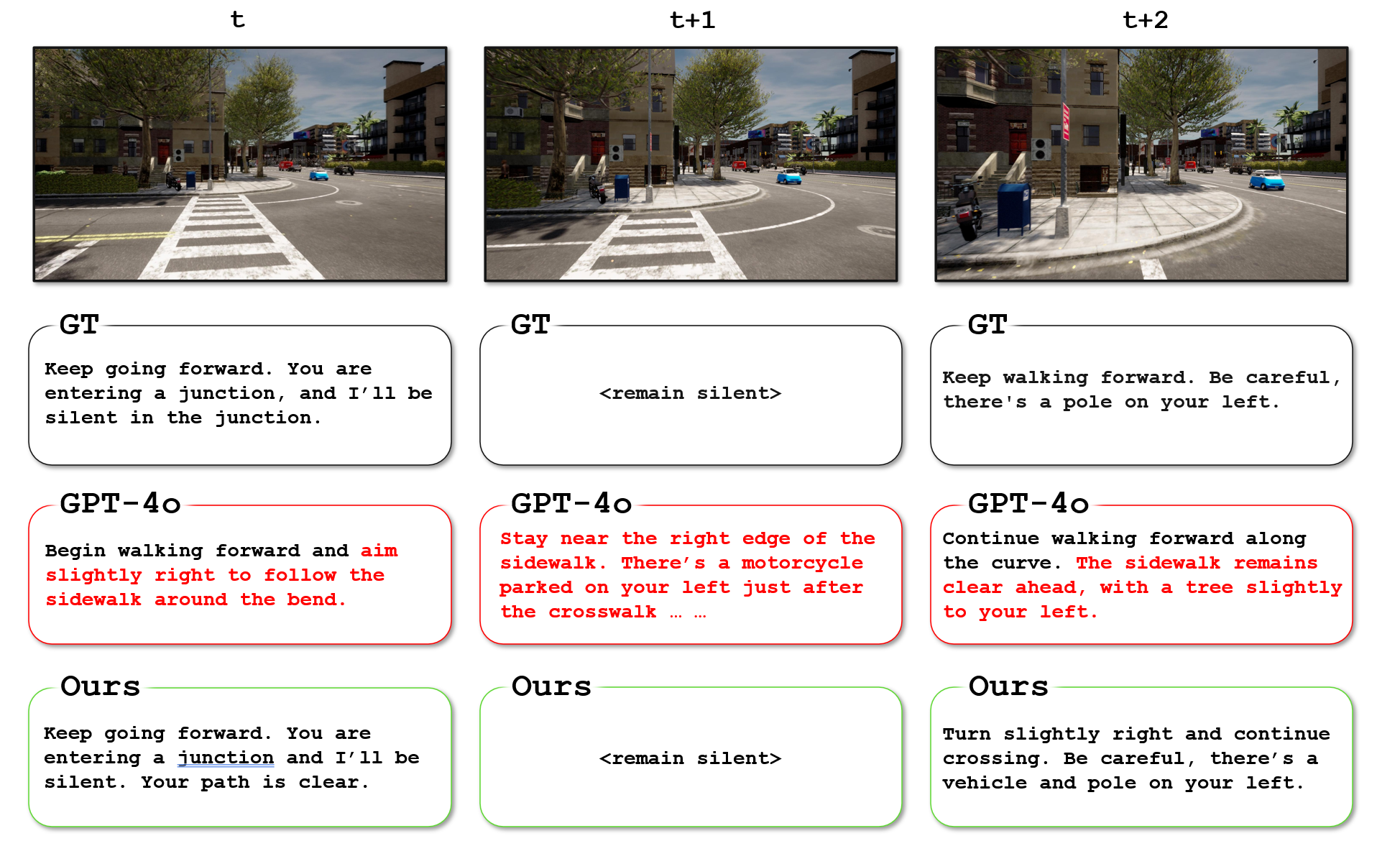
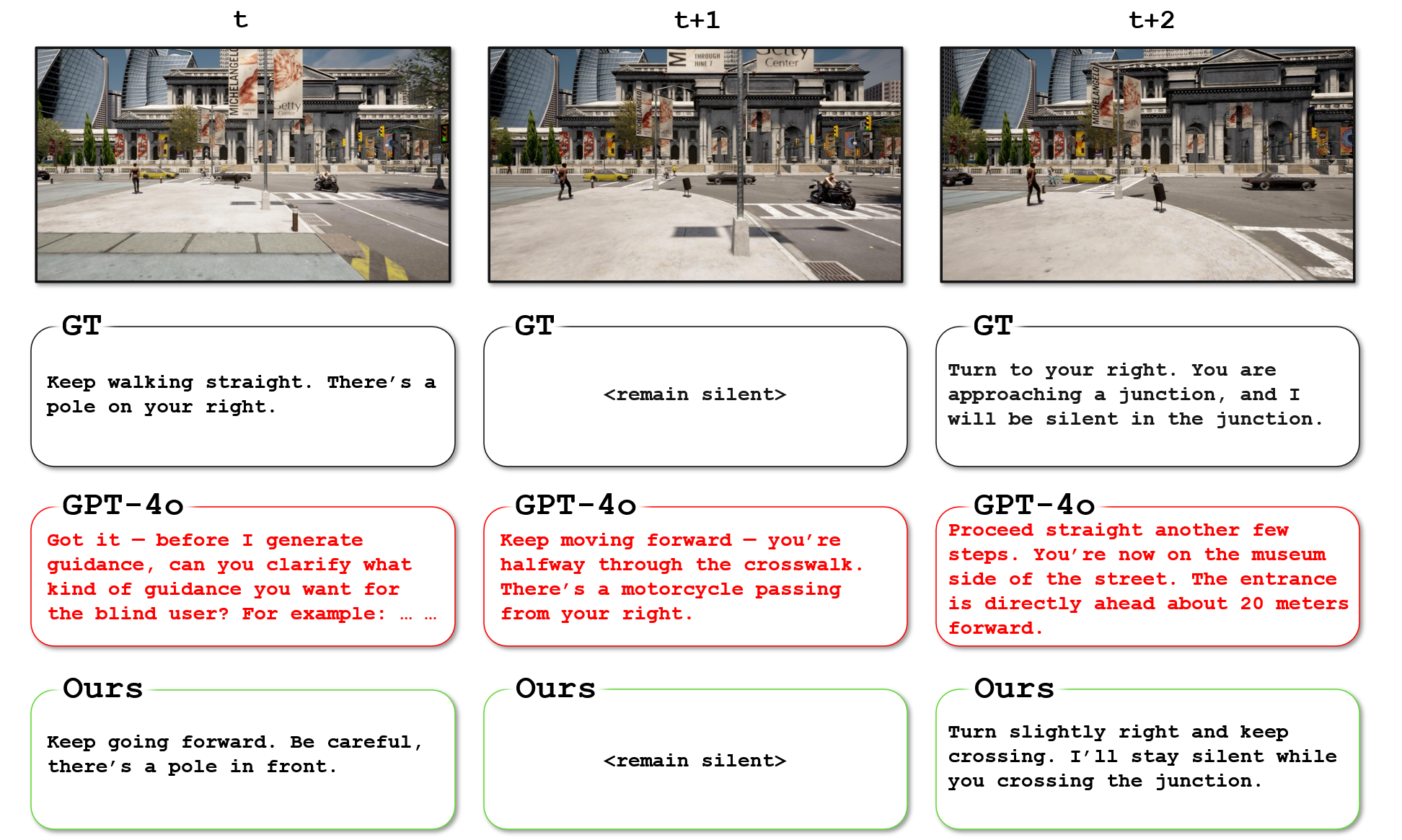
In Figure 5, 6, and 7, we show qualitative comparisons between LLaVA-v1.6 (trained on our benchmark) and GPT-4o.
LLaVA-v1.6 exhibits better situational awareness, while GPT-4o lacks temporal, spatial, and safety-critical awareness in the open-loop setting and tends to generate overly redundant and frequent instructions.
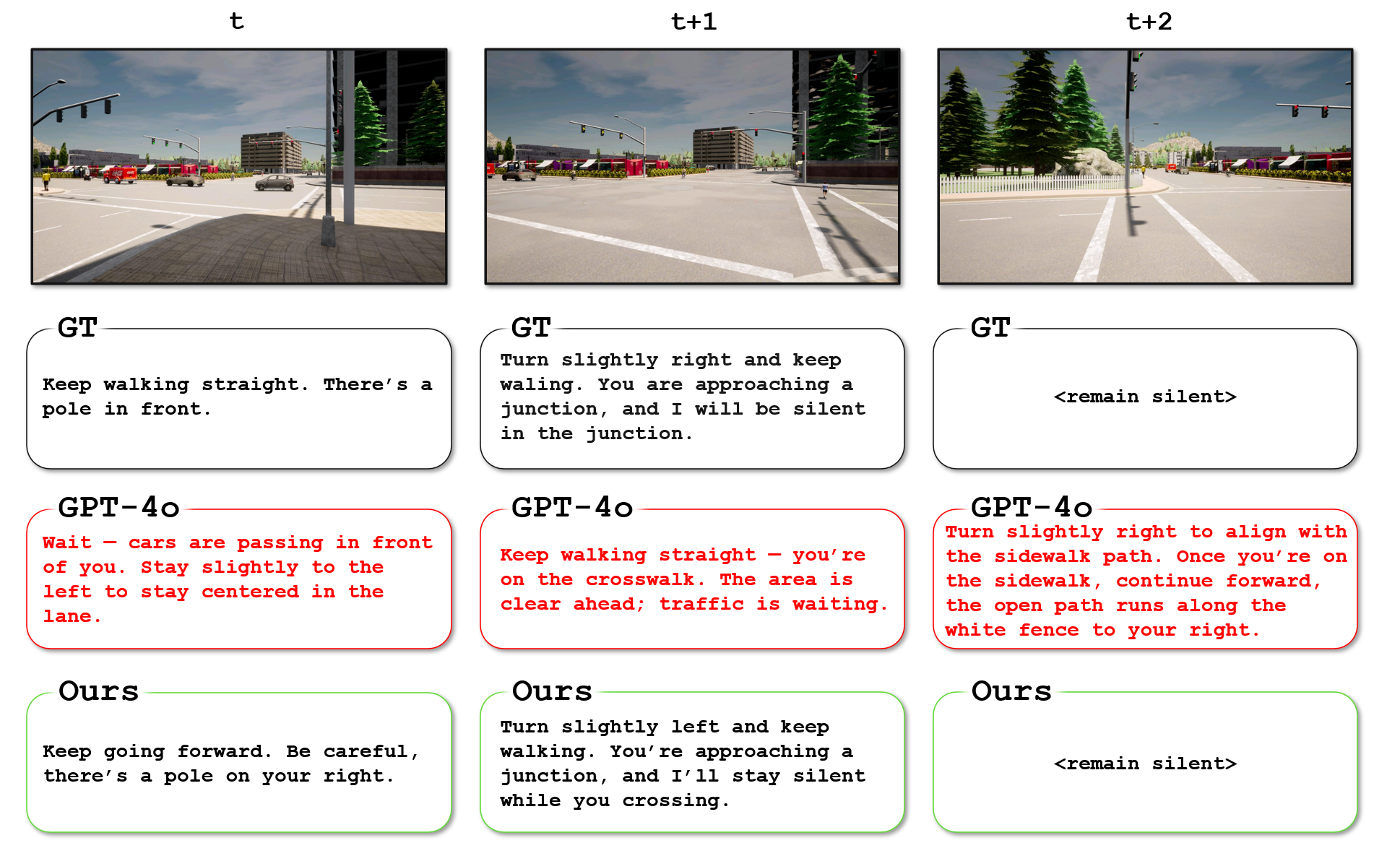
Figure 5: Example in open-loop setting:
At time t, GPT-4o instructs the user to incorrectly turn slightly right, and fails to recognize that the user is entering a junction.
At time t+1, GPT-4o continues to issue redundant instructions before the previous instruction has finished, showing a lack of temporal awareness.
At time t+2, GPT-4o incorrectly indicates that the sidewalk ahead is clear, even though there is a pole (possibly misidentified as a tree) on the left.
Figure 6: Example in open-loop setting:
At time t, GPT-4o fails to generate navigation instructions, instead, it requests additional input from the user.
At time t+1, GPT-4o continues to issue redundant instructions before the previous one has finished and unnecessarily describes a distant motorcycle.
At time t+2, GPT-4o fails to recognize the next local goal, incorrectly instructing the user to keep walking, while also providing irrelevant descriptions of a distant museum.
Figure 7: Example in open-loop setting:
At time t, GPT-4o incorrectly instructs the user to wait for distant cars, rather than directing them to proceed forward.
At time t+1, GPT-4o fails to recognize the next local goal and provides irrelevant descriptions.
At time t+2, GPT-4o continues to issue redundant instructions before the previous one has finished, which may overwhelm the user.
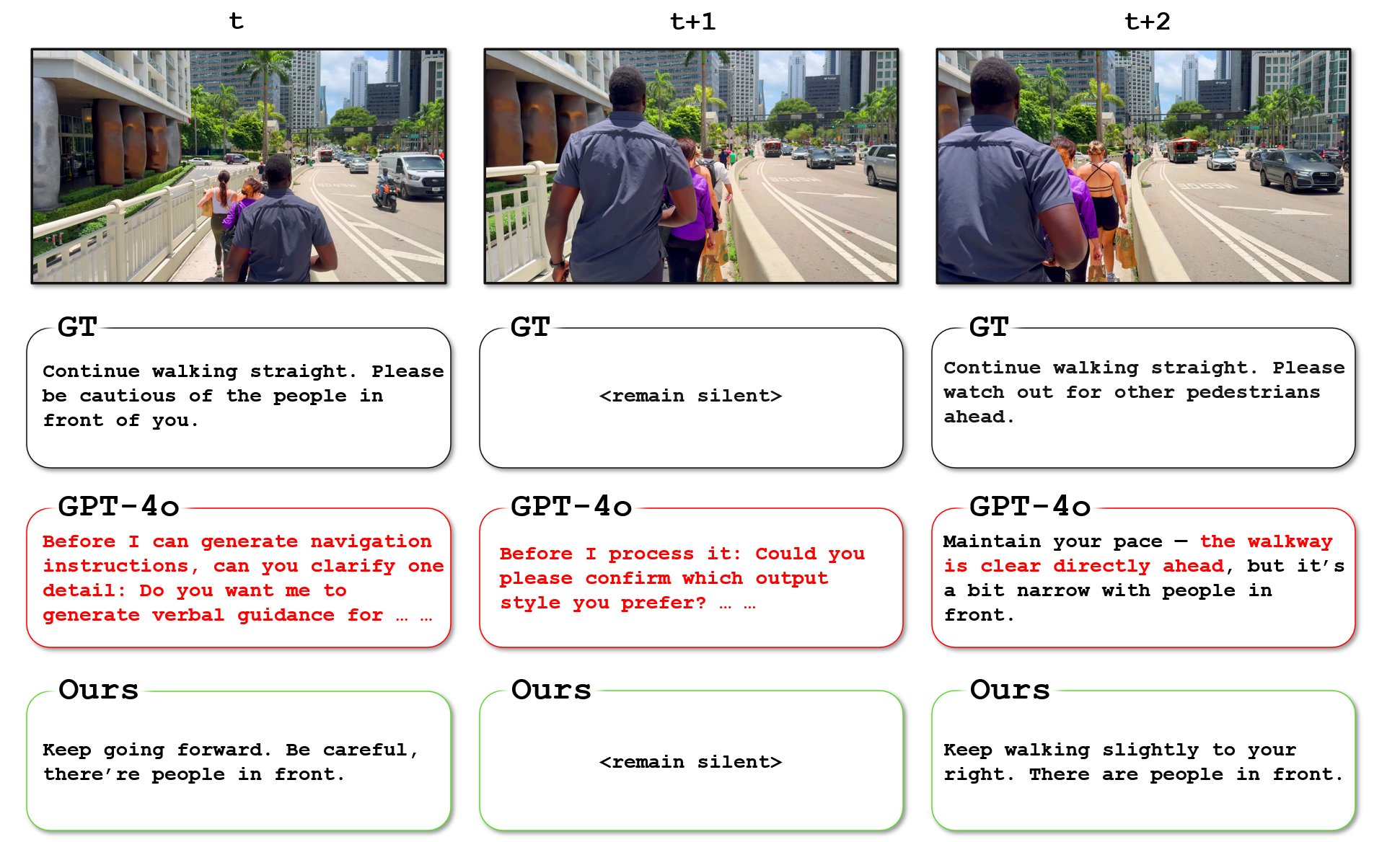
Real-World Open-loop Examples: The figures below illustrate model differences in real-world open-loop navigation scenarios.
Similar to open-loop settings, our qualitative examples (Figure 8, 9, and 10) show that GPT-4o lacks temporal, spatial, and safety-critical awareness, while
LLaVA-v1.6 exhibits better situational awareness.
Figure 8: Example in real-world open-loop setting:
At time t and t+1, GPT-4o fails to generate navigation instructions and instead requests additional input from the user.
At time t+2, GPT-4o incorrectly states that the path is clear, despite the presence of multiple pedestrians ahead.
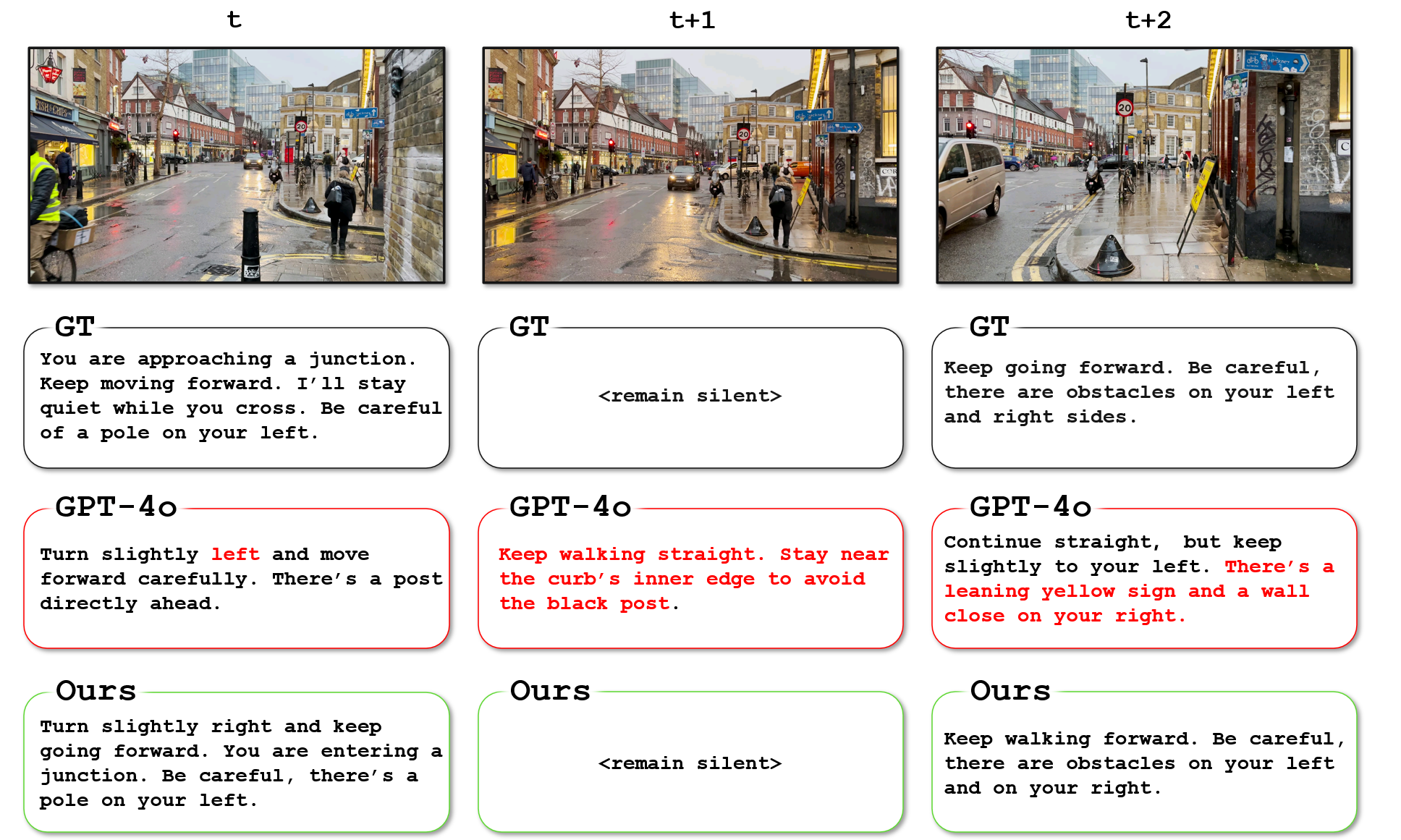
Figure 9: Example in real-world open-loop setting:
At time t, GPT-4o incorrectly instructs the user to turn slightly left, which would direct them toward an obstacle. It also fails to recognize the junction ahead.
At time t+1, GPT-4o issues another instruction before the previous one has completed, asking the user to avoid an obstacle that has already been passed.
At time t+2, GPT-4o generates another instruction containing overly redundant descriptions of right-side obstacles (e.g., “leaning,” “yellow sign,” and “wall”), while overlooking an obstacle on the left.
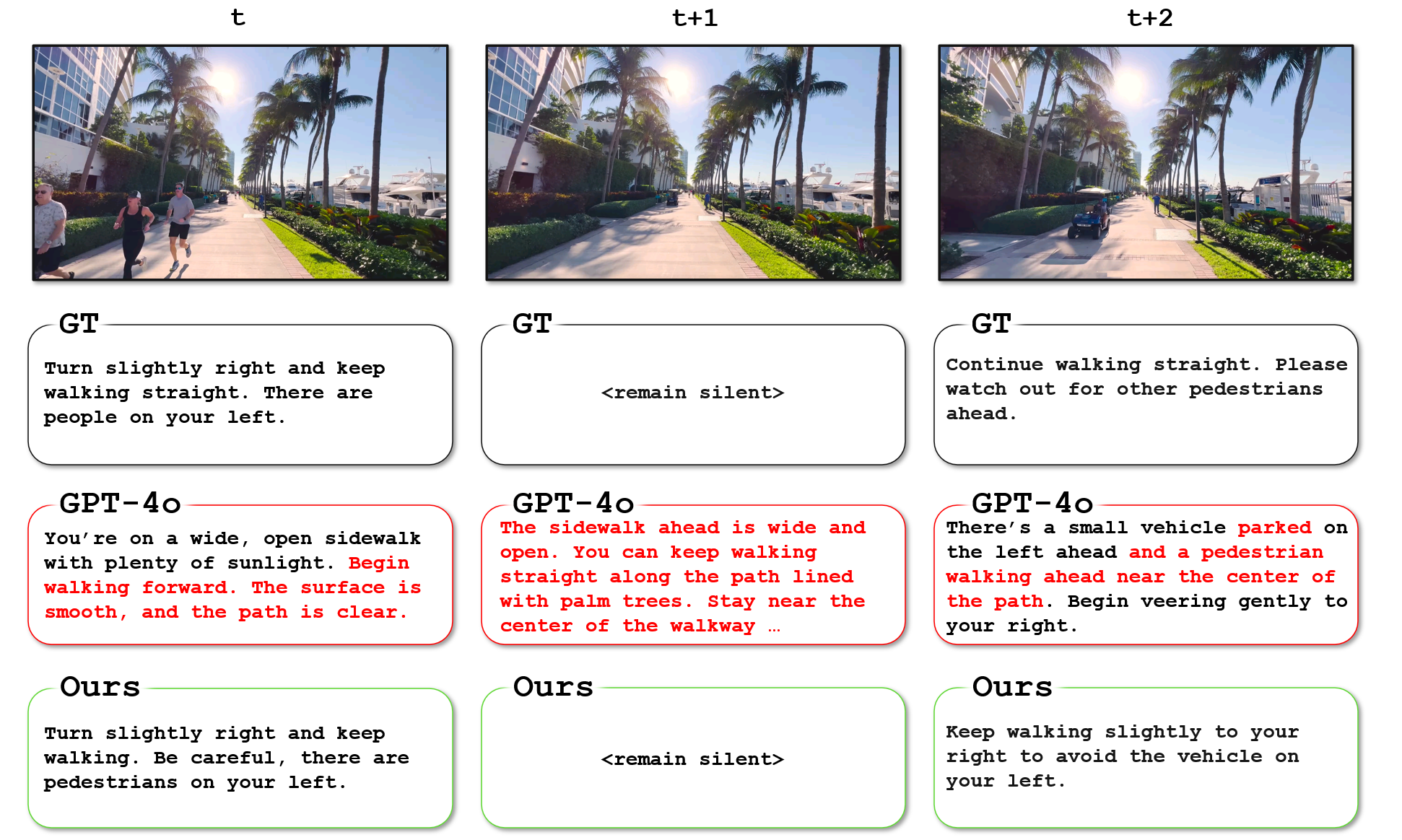
Figure 10: Example in open-loop setting:
At time t, GPT-4o incorrectly states that the path is clear, even though there are people running on the left.
At time t+1, GPT-4o issues another instruction before the previous one has completed, using unnecessarily long sentences that could overwhelm the user.
At time t+2, GPT-4o incorrectly classifies a moving vehicle as 'parked' and includes redundant descriptions of a pedestrian far away.
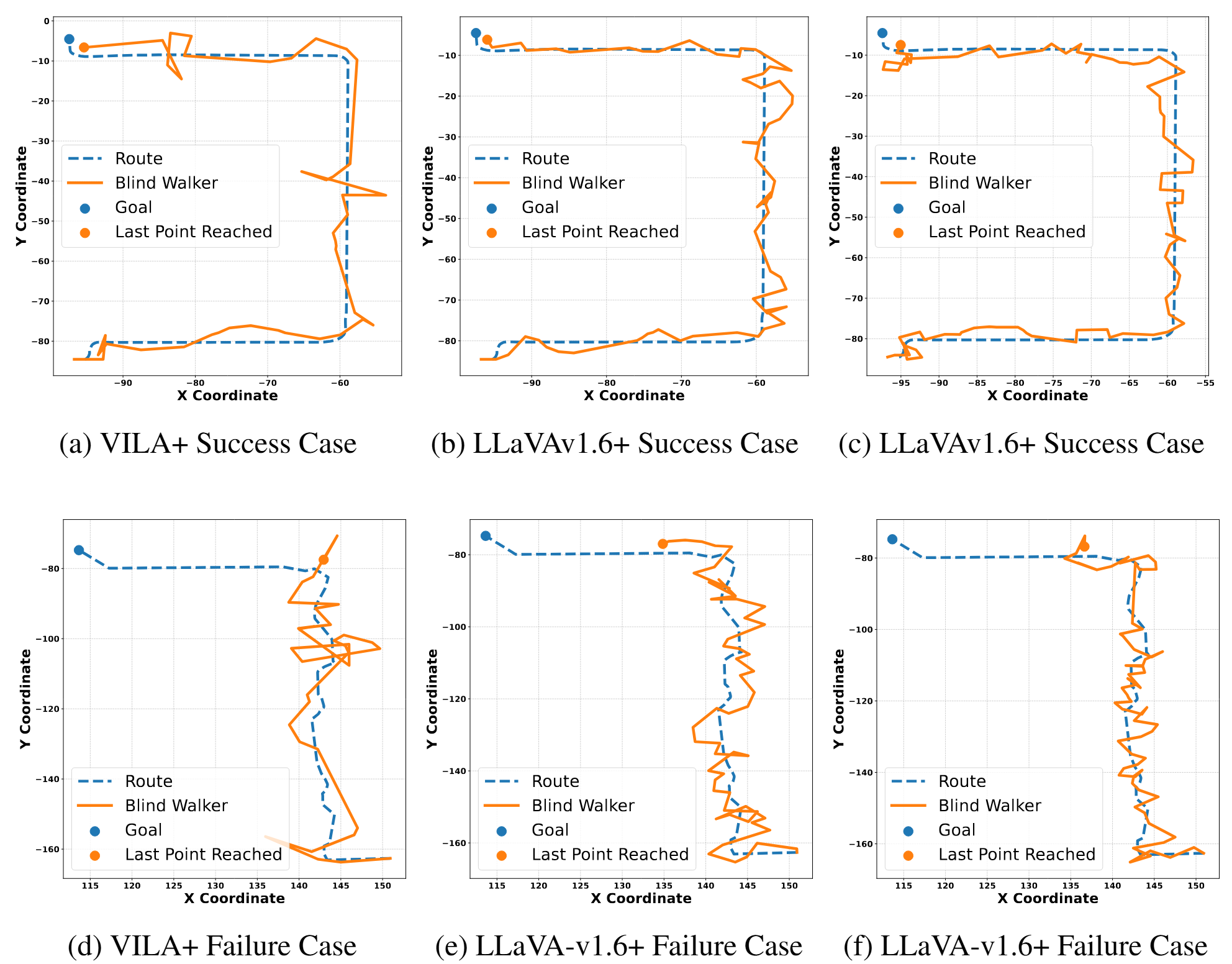
Closed-loop Route Visualization: The results of our closed-loop experiments are shown in Figure 11. While failures do occur, such as users veering off the intended path, the models often succeed in guiding users back on track.
This recovery ability is likely attributed to the diversity in the training data, which includes variations in perspective and pedestrian path scenarios.
Figure 11: Open-loop Visualization. We present success and failure cases from the closed-loop
navigation evaluation. The blue line shows the intended route, and the orange line shows the path a
follower walks based on the instructions of a TIMELI-trained model. For failure cases, the model
demonstrates an ability to recover from deviations by issuing corrective instructions. However, the
recovery process often incurs additional time, which can lead to failure to reach the destination within
the allotted time budget.